How to set up your TopArab.casino blackjack account, step by step

Log in at blackjack.toparab.casino/login and work through the Setup checklist from top to bottom: basics, your Telegram bot, channel and staff group, tournament and leaderboard settings, terms, optional promo posting, a test post, then go live. After launch, your weekly routine is short: post the leaderboard, invite players to the web table, watch the standings and credit winners.
Before you log in
New accounts start after a demo request. We show you the dashboard, answer questions about your market, and open your account. The 3-month free trial starts then; you will find the plans on the pricing page. One subscription covers one tenant: one bot, its channels and its web table.
Have two things ready before you start: a Telegram bot token from BotFather, and two Telegram spaces, a public channel and a private staff group. If you have not made them yet, follow our guide to creating a Telegram bot with BotFather first. It takes about fifteen minutes.
Then log in at blackjack.toparab.casino/login. The first screen is the Setup checklist. Each item turns complete when it is done, so you always see what is left.
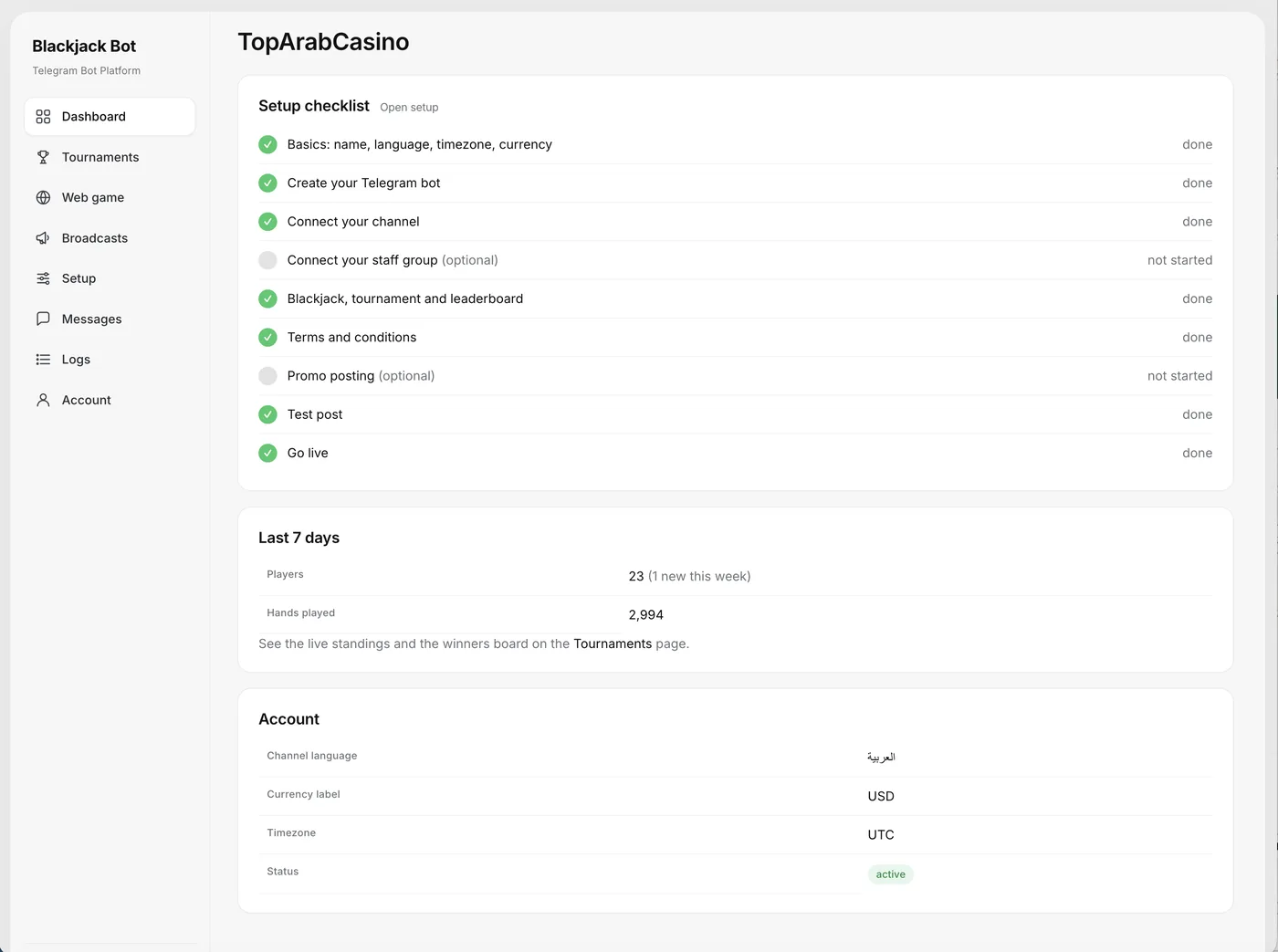
1. Basics: name, language, timezone, currency label
The name is your tenant name. It appears in the top bar of the web table and in the bot's messages, so use the brand players know. The language is your default; each player can still switch the bot to Arabic, English, Spanish, Portuguese or Dutch with /lang. The timezone sets how times display in your dashboard; tournaments themselves run in UTC.
The currency label is cosmetic. You can show chips as "USD" for realism, but they stay virtual: every player gets 10,000 free chips per tournament, with no refills, no shop and no real money.
2. Bot, channel and staff group
The next three items connect Telegram:
- Create your Telegram bot: paste the token from BotFather.
- Connect your channel: the public channel where players see the leaderboard and announcements.
- Connect your staff group: the private group or channel for your team and the sponsoring casino's team. When a tournament closes, the bot posts winners here, then each winner's registration email, so the casino can credit the prize.
The bot must be an administrator with the right to post messages in both spaces. If an item will not turn complete, that is the first thing to check; then make sure the token was copied in full, with no extra spaces.
3. Blackjack, tournament and leaderboard
This is where you shape the competition. The table rules are fixed for every tenant (8-deck shoe, blackjack pays 3:2, dealer stands on all 17; full list on the blackjack tournament page). What you decide:
- Period: weekly (Monday to Sunday) or by calendar month, in UTC. Tournaments renew automatically.
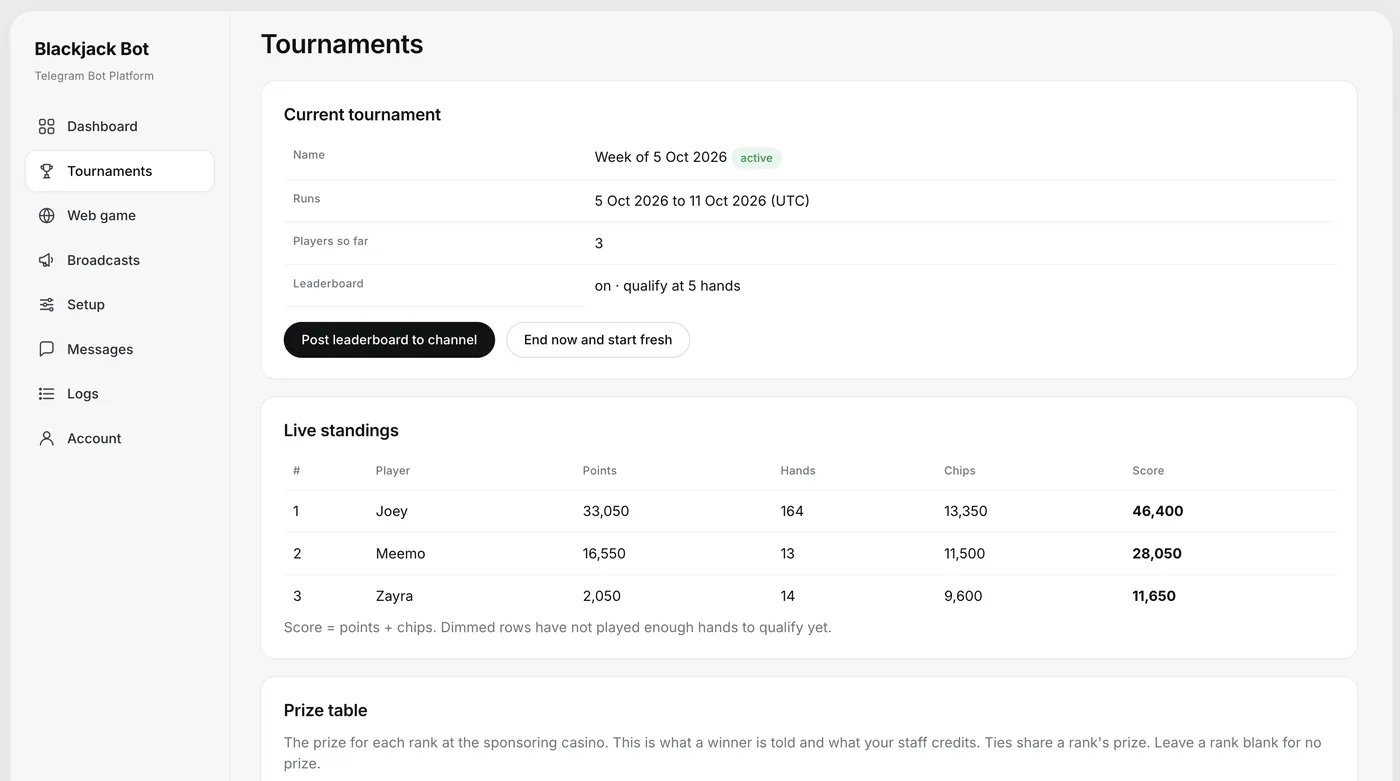
- Minimum hands to qualify, for example 5. A player below that number does not rank, which stops someone from placing one lucky hand and leaving.
- Rank alerts: the bot tells a player when they qualify, and when they enter or move inside the top N you choose.
- Prize table per rank: what each top rank wins, as a bonus balance at the sponsoring casino with 1x wagering. Players can see the list with
/prizes. Ties share rank and prize, so plan for that.
Weekly or monthly? A weekly tournament gives players a fresh start every Monday and gives you a winner announcement every week, which keeps the channel active. A monthly tournament gives each player more time to climb and suits a bigger prize per rank. If you are unsure, start weekly: you learn faster because every cycle ends sooner. Agree the prize table with the sponsoring casino before you go live, since their team credits the prizes.
Scoring is the same for all tenants: points equal the amount wagered, win or lose, plus 50 per winning hand, and a blackjack scores 200 plus the wager. The final chip balance is added at the end, so the score is points plus chips.
4. Terms and conditions
Write the terms that apply to your tournament: who can join (21+), how prizes are credited, the wagering requirement and any rules from the sponsoring casino. We describe how the product works; we do not give legal advice. You are responsible for the laws and advertising rules of the countries you target, so have the terms checked for your markets. Write them in plain language: unclear terms create questions in the channel and complaints after winners are announced.
5. Promo posting (optional)
Promo ads are scheduled messages the bot sends for you. You choose when they go out (daily, on weekdays, at a set date and time, or after a tournament starts) and where: by direct message to players or in the channel. A weekly DM cap limits how many promo messages one player receives per week. Start with a low cap; a bot that sends too much gets muted or blocked, and then your winner messages do not reach anyone either.
6. Test post and go live
The test post confirms the bot can publish where it should. If it does not appear, recheck the administrator rights from step 2. When every item is complete, go live. Start the bot yourself as a player once, play a few hands and check that your nickname appears in the standings. Our demo bot, @toparabcasino_bot, shows what players should see.
Your first week after launch
Post the leaderboard to the channel
The leaderboard image, with your logo in the header and the Cairo font for Arabic names, goes to the channel with one click: Post leaderboard to channel. Posting it a few times a week gives your channel fresh content and shows newcomers that the competition is real. A player who sees their nickname on the image has a reason to come back and defend their rank.
Use Broadcasts
The Broadcasts center sends text, image and button posts to your subscribers or to the channel, with a test send first and an archive with counts afterwards. The quick message "Play on the web" invites every player to the web table, each in their own language. To put that table on your own site, read our guide to embedding the blackjack table on your website.
Watch the live standings
The Tournaments page shows the current tournament, live standings with points, hands, chips and score for each player, and your prize table.
A simple weekly rhythm
- Monday: the new weekly tournament starts in UTC. Announce it in the channel with the prize table.
- Midweek: post the leaderboard and send the "Play on the web" invite.
- Weekend: post the leaderboard again, so players near the top know where they stand before the close.
- After the close: watch the staff group and make sure every winner is credited and marked.
Credit winners from the staff group
When the tournament closes, the bot congratulates each winner and asks them to register at the sponsoring casino and reply with the email they used. That email arrives in your staff group. The casino team credits the bonus balance and marks the prize credited in the dashboard. Fast crediting matters, because the winner's first experience at the casino is how quickly their prize appears. For why this loop turns players into depositors, see how free tournaments convert players.
Questions and answers
How do I get a TopArab.casino account?
Request a demo at /en/request-demo/. New accounts start after the demo, and the 3-month free trial begins then. You log in at blackjack.toparab.casino/login.
Can I change the tournament from weekly to monthly later?
The period is part of the tournament settings in the setup checklist. Tournaments run weekly (Monday to Sunday) or by calendar month in UTC and renew automatically.
Do players need real money to play?
No. Every player gets 10,000 free virtual chips per tournament with no refills and no shop. The prize is a bonus balance at the sponsoring casino with 1x wagering.
Who credits the prizes?
The sponsoring casino's team. Winners' emails arrive in your private staff group, the casino credits the bonus balance and the prize is marked credited in the dashboard.
Is promo posting required?
No, it is optional. If you use it, set a weekly DM cap so players do not receive too many messages.